
Monday, November 16, 2026
How to Improve Your Brand's Workflow And Create a Better BFCM Experience: 6 Strategies with Cleverific & Uxify
BFCM puts pressure on every part of an ecommerce business, from the moment someone lands on your store to the moment their order arrives. And while more traffic and more orders are great problems to have, they also mean more work for your team.
Together with Uxify, we've put together six practical strategies to help you simplify that work, improve the shopping experience, and make the most of your BFCM traffic, without adding more to your team's already busy schedule.
1. Reduce support tickets with self-serve order editing
When customers can fix their own order mistakes through a self-service portal, changing a shipping address, swapping a product option, or adding an item, they don't need to contact support. This directly reduces order change ticket volume and prevents cancellations, freeing up your support team's time to prioritize the complex issues that require human attention.
2. Offer personalized post-purchase upsells
Post-purchase upsells are a marketing strategy where a business offers customers additional products or services after they complete a purchase. The window right after purchase is when your customer is most engaged, so upsell offers at this moment can substantially increase average order value when done right.
Random discounts won't click with your customer. Your post-purchase flow should be as methodical as your front-end CRO.
That's why Cleverific analyzes order history to create customized upsell offers that are uniquely tailored to the customer. The modest 5–7% conversion rate from this can compound quickly at scale, and it's an effortless way to collect extra revenue without spending more on ads.
Post-purchase upsell offers can meaningfully enhance the overall experience for shoppers and increase customer lifetime value, converting hundreds of thousands or millions in incremental sales for your brand.
3. Let AI agents answer common questions during the weekend
If you already know the weekend will bring peak traffic, it's best to handle the most frequent questions in advance so your support team isn't buried during the shopping rush.
Start by going through last year's support logs and pulling out the questions that come up most often. These are usually about shipping cutoffs, discount codes that won't apply, delivery times and return windows. Write a clear, ready-to-send reply for each one and save them in your helpdesk, so AI agents can answer in a few clicks instead of typing the same response over and over.
That leaves your human agents free for the conversations that need judgment. And when customers can fix order mistakes themselves through self-serve editing, as covered in strategy 1, many of those tickets never get created in the first place.
4. Keep pages fast without a developer on call all weekend
Some of that work can now be handed to AI agents, which run alongside your store and respond to what shoppers are doing in real time. Here's how one of Uxify's agents works.
Navigation AI watches each live session (where the shopper is scrolling, what's in view, which device they're on) to predict which page a shopper is most likely to visit next. It then prepares that page in the background, so when the shopper clicks, it can open almost instantly.
Across the platform, Navigation AI:
- Predicts the next page correctly 72% of the time
- Makes navigations 55% faster
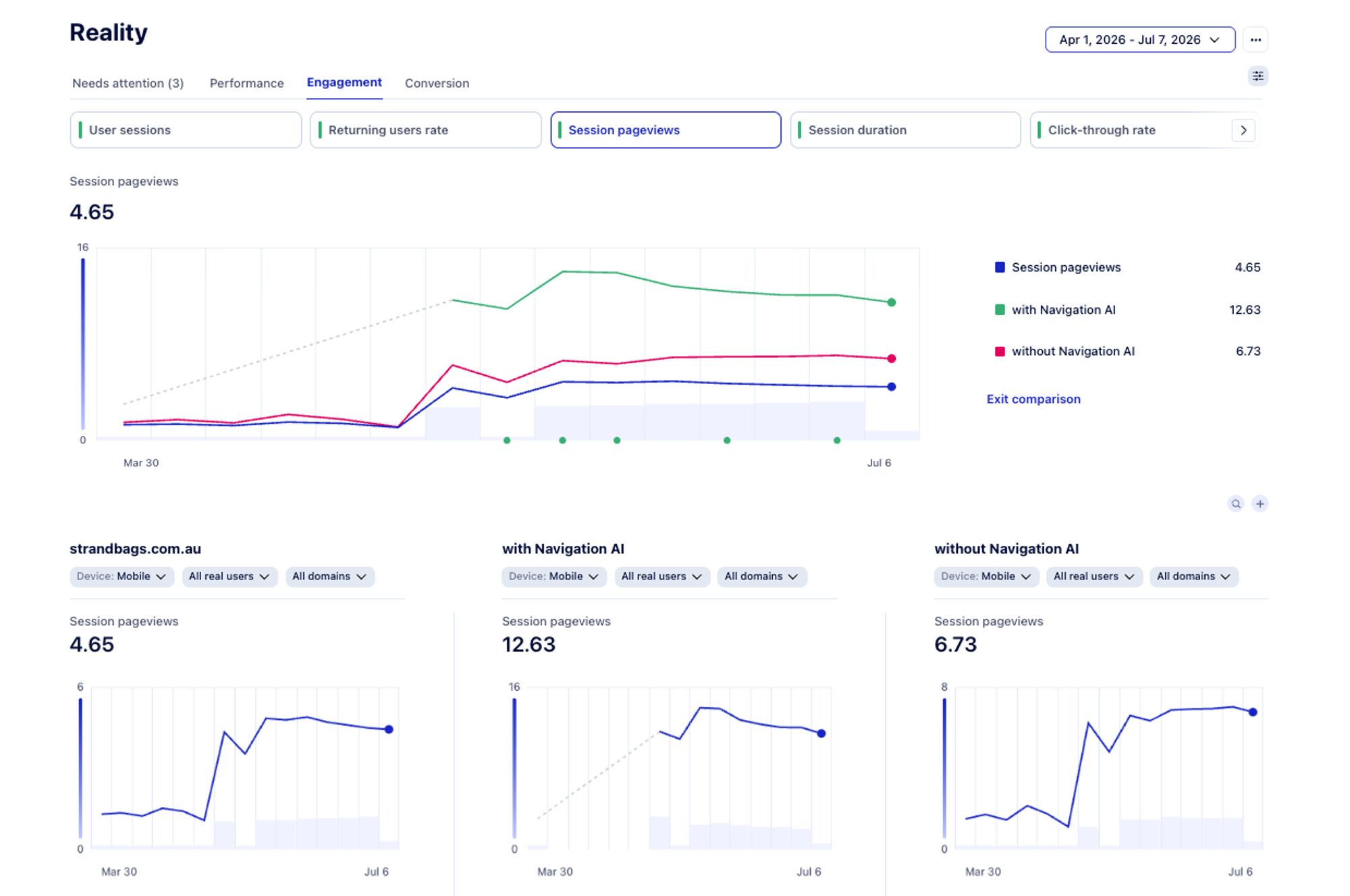
- Increases pageviews per session by about 30%
The average conversion lift is around 1%, which sounds modest until you apply it to your biggest revenue weekend of the year.
Strand, the Australian bag and luggage retailer, added Navigation AI to its existing Shopify store with no redesign and no extra work for the team. On mobile sessions where pages loaded ahead of the tap, shoppers viewed nearly twice as many pages per visit, add-to-carts rose 14% and form abandonment fell by 47%. You can read how they did it in the Strand case study.
You don't need to be technical to keep your store fast
Much of the slowdown comes from things the team adds while preparing the sale, so a few simple habits go a long way:
- Keep one list of everything added for the sale. Every new app, popup, timer and banner goes on it with an owner, so nothing stays on the site by accident once the campaign ends.
- Ask your app partners about speed. Before installing something new for BFCM, ask the vendor how it affects how fast your pages load on mobile. Good partners will have an answer.
- Shop your own store on a phone. Before the sale goes live, open your top product pages on your phone, the way most shoppers will. If it feels slow to you, it feels slow to them.
As a goal, aim for your main product content to appear in about 1.5 seconds, because your shoppers, especially on BFCM, are even less patient than normal.
5. Save BFCM carts before shoppers leave, without extra follow-up work
Most recovery tools only step in after the shopper has gone. An email or text arrives minutes or hours later, often after they've already bought somewhere else, and on BFCM it lands in an inbox full of other brands' offers. For the shopper, it's one more message they might ignore. For you, it means paying again, through email and SMS costs, to win back a visitor you had already paid to bring in.
But what if you could give shoppers another chance to complete their purchase before they leave in the first place?
Catch the moment of leaving
When a shopper with items in their cart tries to close your store and it's their last open tab, an AI agent such as Uxify's Carter can trigger the browser's own "are you sure you want to leave?" prompt. Because it comes from the browser itself, it gets more attention than a regular popup, and the page stays open until the shopper answers.
When Uxify asked that question across seven Shopify stores for 30 days, about 1 in 6 shoppers who were about to leave with a full cart chose to stay and went on to checkout in the same visit, with no discount or offer involved. For many of them, closing the tab wasn't a final decision (and sometimes was a mere accident), and the question gave them an easy way to finish what they started. For your team, it means fewer follow-up flows to plan and manage during an already busy weekend.
6. Catch BFCM problems early, without watching dashboards
Preparation only takes you so far. Something usually changes during the weekend itself: a promo app updates its script or a new countdown timer starts pushing the page around on mobile.
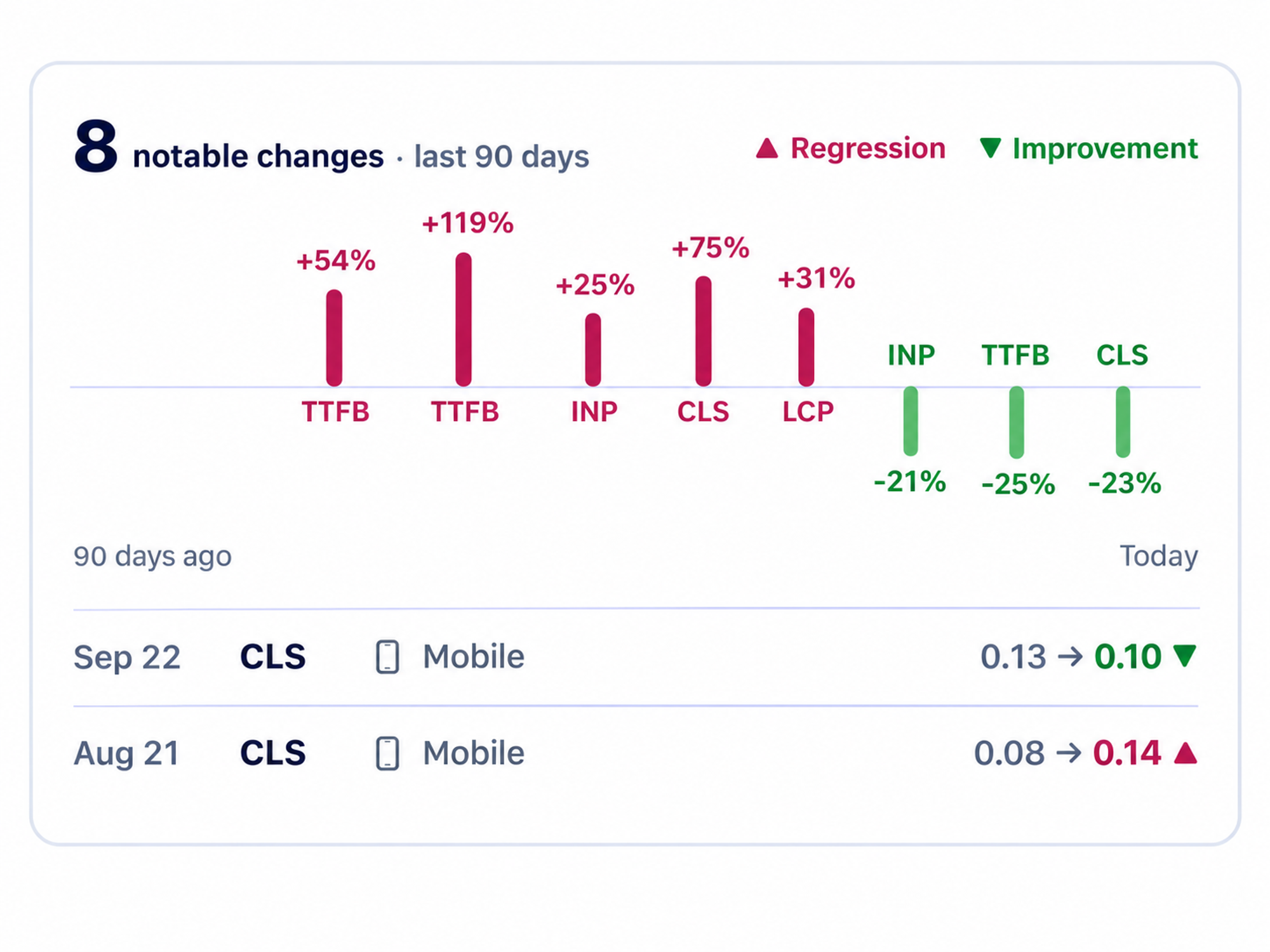
Not every monitoring tool is designed to catch these problems as they happen. Google's Core Web Vitals report in Search Console is based on a rolling 28 days of visits, so a slowdown that starts on Black Friday may not clearly show up until well after Cyber Monday. By then the weekend, and the revenue, is gone.
Replace dashboard watching with alerts
The weekend runs smoother when problems come to you, instead of someone having to go looking for them. Your team needs to know when the shopping experience starts getting worse, what might be causing it, and where to focus its attention.
In Uxify, that work is split across three parts:
- Vita, the Core Web Vitals agent, flags a speed or stability regression the same day it happens. It also explains what may be causing it, helping your team identify meaningful changes without digging through reports.
- Custom alerts let you set your own thresholds for the pages that matter most on BFCM, such as your sale collection, top product pages, or cart.
- Funnels are built automatically from the paths real shoppers take through your store. You can see how many people move from a collection page to a product page, to the cart and on to checkout, and how much revenue drops off at each step. Ask Uxi, Uxify's AI assistant, and it will point to the biggest leaks and suggest what to fix first.
Prepare for the BFCM weekend in a few simple steps
- Set a baseline the week before. Note how your key pages and funnel steps perform on a normal day, so a change on Black Friday is easy to spot.
- Automate standard replies so your agents can answer commonly asked questions.
- Turn on alerts before the sale starts, not on Friday morning.
- Name one owner for alerts for each day of the weekend, and agree on who can approve a fix.
- Decide in advance what you'll switch off. If a new app or timer causes a regression, you should already know whether you'll disable it, rather than debating it at the peak hour.
A better BFCM experience shouldn't mean more work for your team
Put together, all six strategies point the same way. Faster pages, saved carts, easier order changes, relevant post-purchase offers, ready answers to common questions and timely alerts all help create a better experience for shoppers without increasing the workload behind the scenes.
With the right tools handling repetitive tasks and spotting problems early, your team has more time for the things that still need a human touch: shaping the offers, helping customers who need real care and making the call when something unexpected happens.
The result is a smoother weekend for your shoppers and a much calmer one for your team.
Recent posts


Self-serve order editing
Let customers fix
their own orders.
Give shoppers a short window to edit their Shopify orders after checkout. Cut your most frustrating support tickets and capture more revenue before fulfillment.