
Wednesday, March 11, 2026
Post-Purchase Revenue Optimization for Shopify: How PRO Works
Most Shopify brands obsess over what happens before checkout. The ad, the landing page, the offer. The moment someone clicks "buy," the conversation stops.
That's the gap PRO is built for.
Watch the 3-minute breakdown: Josh Stratton, Head of Growth at Cleverific, walks through exactly how post-purchase revenue optimization works and what it means for your store's AOV and CLV.
What Is PRO?
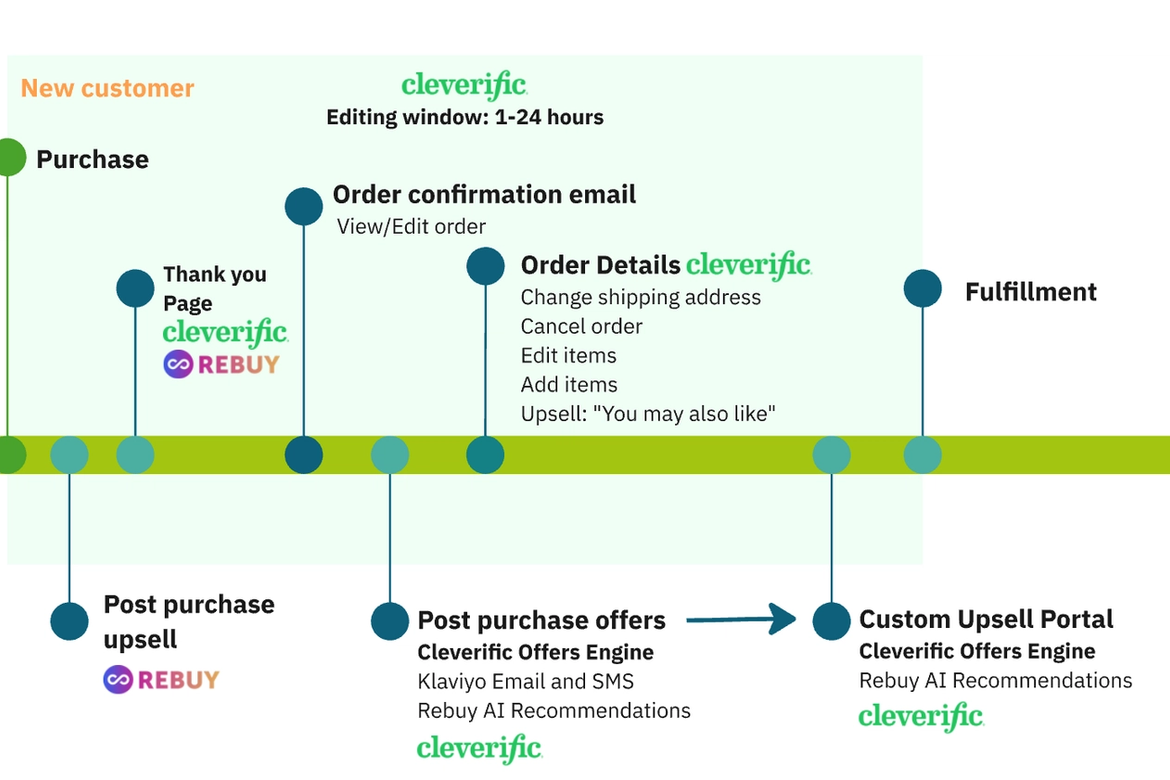
PRO stands for post-purchase revenue optimization. It's Cleverific's system for capturing revenue in the window between checkout and fulfillment. Every order gets routed through two engines: the Offers Engine and the Retention Engine. Together, they grow order value, bring customers back, and compound over time without spending more on acquisition.
Here's how each one works.
The Offers Engine
Not every customer should see the same offer. The Cleverific Offers Engine routes each customer and each order to the offer most likely to convert for that specific situation.
A practical example: a customer checks out just under your free shipping threshold. The Offers Engine surfaces a one-click upsell to add an item that gets them over the line. The item is automatically added. Shipping is removed. One click, done.
If they don't convert on-site, the system follows up. A branded email goes out through Klaviyo, Attentive, or whatever messaging platform you already use. The customer clicks, lands on a conversion-optimized branded page with their cart preloaded, and redeems the offer in two clicks. No new checkout. No re-entering payment details.
This is what a post-purchase upsell flow on Shopify should look like.
The Retention Engine
The Offers Engine grows the current order. The Retention Engine brings customers back for the next one.
One of the strongest patterns here is gift card retention. Offer a customer a free gift card post-purchase or as part of a bundle, and now they have store credit sitting with your brand. Real money, earmarked specifically for your store.
The Retention Engine sends timely reminders to spend it, powered by propensity modeling: offers based on what that specific customer is most likely to buy next. They click, land on a conversion-optimized branded page with their cart preloaded, and place a second or third order without going back through your full funnel.
The Flywheel
Once customers move through the system, they're routed back to the top and the cycle continues. This builds momentum over time: customer loyalty, sustainable AOV growth, and compounding CLV. Not a one-time bump.
Self-Serve Order Editing: The Foundation
Before PRO can do its job, there's a layer underneath that most merchants underestimate: giving customers the ability to fix order mistakes on their own.
If someone bought the wrong size, entered the wrong shipping address, or wants to add a product to an existing order, and they have to email support to do it, a significant portion of them won't. They'll cancel. Around 40% of customers who cancel and reorder don't come back.
Cleverific's self-serve order editing gives customers a portal to handle changes without contacting support: edit a shipping address or billing address, change product options after checkout, exchange products, add products to an existing order, split bundles, and more. This reduces support tickets, prevents cancellations, and protects the revenue PRO is designed to grow.
It's also what separates Cleverific from a basic Shopify post-purchase upsell app. The post-purchase experience isn't just about adding to the order. It's about keeping the order.
Why This Matters for Shopify Merchants
Shopify's native order editing is limited. The moment a customer wants to change something after checkout, you're in manual territory. Your support team becomes the middleware. That doesn't scale.
Cleverific has been the Shopify order editing app for merchants who've outgrown native Shopify since 2015. The platform handles what Shopify can't: draft order workflows, B2B and wholesale order editing, Shopify Flow-based automation, adding a gift with purchase automatically, and the full PRO system layered on top.
If you're asking how to increase AOV after checkout on Shopify, how to let customers edit orders after checkout, or how to reduce order change support volume, PRO is where that answer lives.
Frequently Asked Questions
What is post-purchase revenue optimization on Shopify? Post-purchase revenue optimization (PRO) is a system for capturing revenue in the window between checkout and fulfillment. It includes intelligent upsell offers on existing orders, retention flows that bring customers back for new orders, and self-serve order editing that prevents cancellations.
How does Cleverific's post-purchase upsell work? Cleverific's Offers Engine routes each order to the offer most likely to convert for that specific customer. It presents a one-click upsell on-site and follows up via email through Klaviyo or Attentive if the customer doesn't convert. The offer is added to the existing order with no new checkout required.
What is the difference between a post-purchase upsell app and Cleverific PRO? A standard Shopify post-purchase upsell app shows a single offer immediately after checkout. Cleverific PRO includes an Offers Engine for upsells on existing orders, a Retention Engine for driving repeat purchases, and self-serve order editing to prevent cancellations. All three work together as a connected post-purchase system.
How does self-serve order editing reduce support tickets on Shopify? When customers can fix their own order mistakes through a self-service portal, changing a shipping address, swapping a product option, or adding an item, they don't need to contact support. This directly reduces order change ticket volume and prevents cancellations.
Does Cleverific work with Klaviyo and Attentive? Yes. Cleverific's post-purchase offer flows send through your existing messaging platform: Klaviyo, Attentive, or others. Branded emails go out from your stack, not a generic third-party sender.
What Shopify order editing features does Cleverific support? Cleverific supports editing shipping and billing addresses, exchanging products, changing product options after checkout, adding products to existing orders, splitting bundles, adding gifts with purchase automatically, draft order workflows, B2B and wholesale order editing, and Shopify Flow-based automation.
Cleverific is a post-purchase system for Shopify merchants, trusted since 2015. cleverific.com
Recent posts


Self-serve order editing
Let customers fix
their own orders.
Give shoppers a short window to edit their Shopify orders after checkout. Cut your most frustrating support tickets and capture more revenue before fulfillment.